spis2022.github.io
08/24 FOCS web apps project lecture
More on Sessions
Remember: don’t use the repl mini-browser to test session code!
It doesn’t seem to handle Flask sessions properly.
Use a regular browser (Firefox, Chrome, Safari, etc.)
A word guessing game that uses sessions
https://replit.com/@phtcon/Word-Guess#main.py
Same word guessing game, but with some improved CSS
https://replit.com/@phtcon/Word-Guess-Better-Looking#static/style.css
Using GitHub OAuth to allow logins
We’ll use this library: https://github-flask.readthedocs.io/en/latest/
Example repl: https://replit.com/@phtcon/spis2022-0824-try-login#main.py
First, don’t put “github” or “oauth” into the name of your app, or else Google Chrome might think you are doing “phishing”.
Second: any time you see pip install foo, such as pip install GitHub-Flask:
What that’s saying is: you need to download and install an extra python package.
But for repl, we use this instead:
In the Shell window, use:
python -m poetry add GitHub-Flask
python -m poetry install
Also: for the client id and client secret, use the Secrets function in Repl.it
OAuth login
To use the following code, you’ll need to configure APP_SECRET_KEY, GITHUB_CLIENT_ID and GITHUB_CLIENT_SECRET as shown below.
Example: https://replit.com/@phtcon/spis2022-0824-try-login-1#main.py
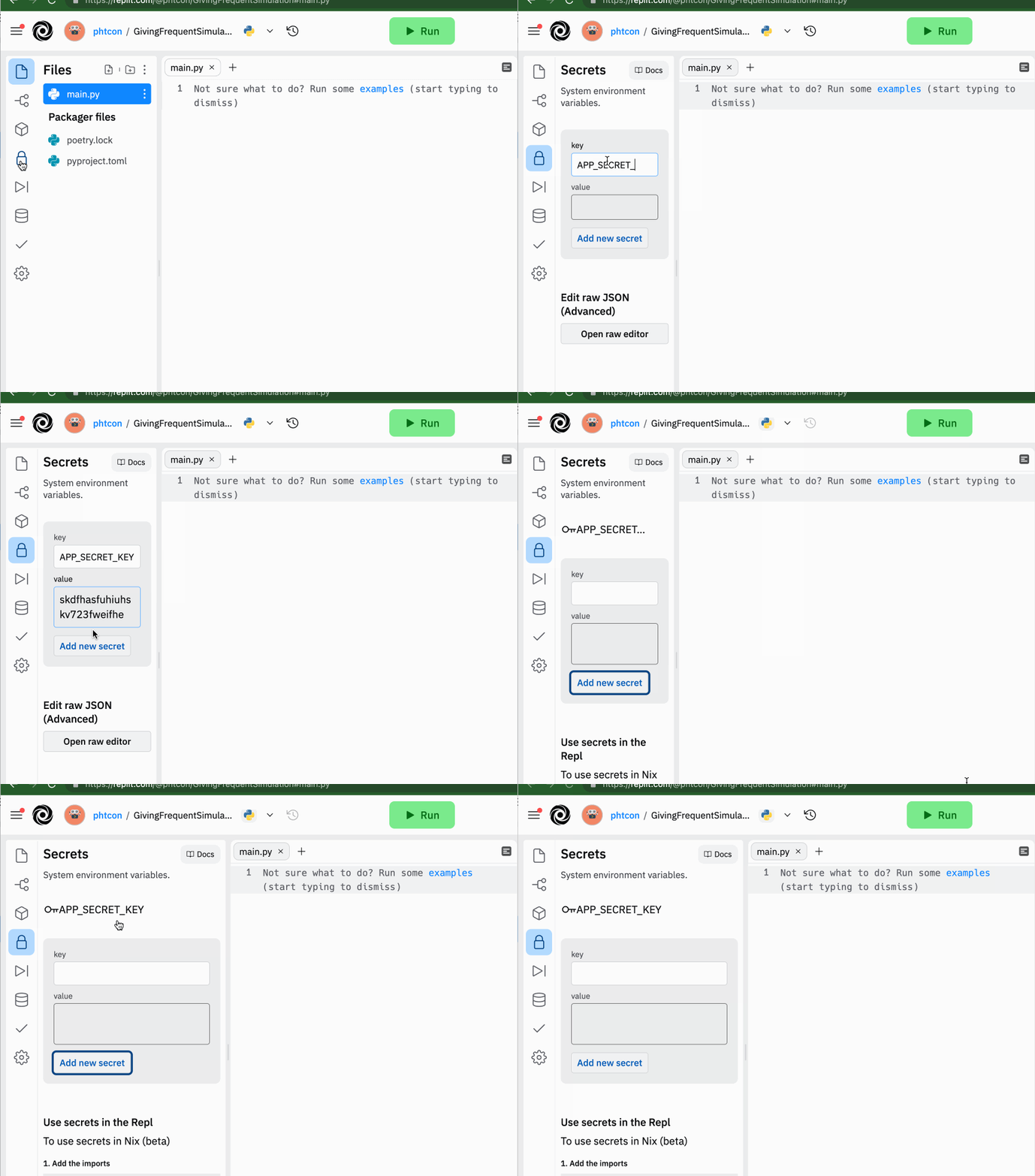
Configuring APP_SECRET_KEY
The value of APP_SECRET_KEY is used to cryptographically sign your sessions. It can be any string of letters and numbers such as these examples:
szifjsSkjhkShjjFdofzsjlvi8ihweifaw3lfhia8zvjKJHKJsiljzlsdivzlsu2q2o9zojlvdloiqfloivdzSI8ZVSLsi8hlilvselviSIVSLV
To set it in a a repl, follow these instructions (as illustrated in the animation below):
Configuring GITHUB_CLIENT_ID and GITHUB_CLIENT_SECRET
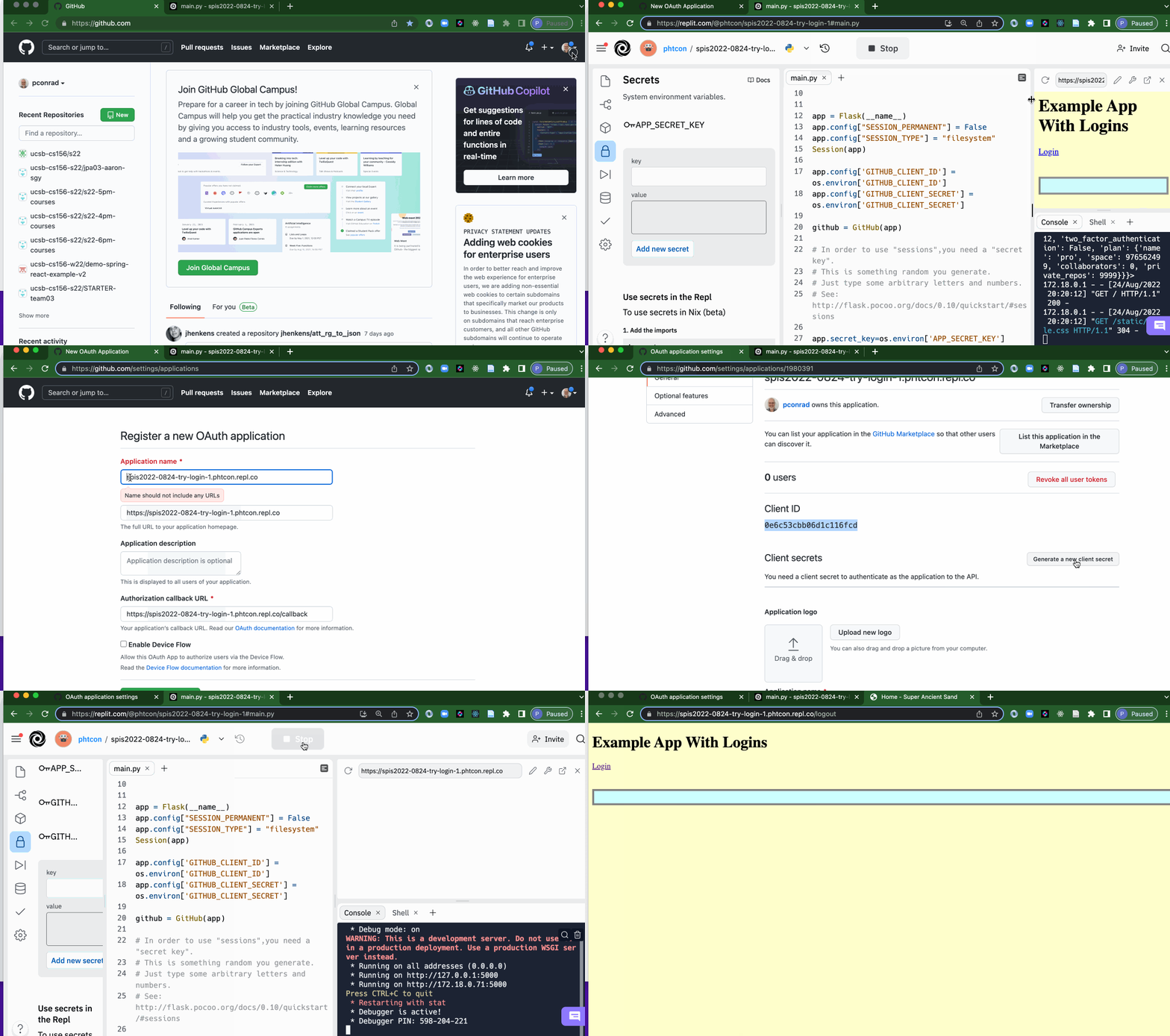
These are configured in the same way as APP_SECRET_KEY, but the values must be obtained from the GitHub Settings for your account.
Here are the instructions and an animation to illustrate the idea. You will need the URL of your website to proceed (e.g. https://spis2022-0824-try-login-1.phtcon.repl.co), i.e. the URL that you type in to bring up your web app in a regular browser (not the URL of your repl interface where you type in the Python code.)
- Login to GitHub at https://github.com and go to Settings
- Go to Developer Settings (left navigation, near the bottom)
- Select OAuth Apps
- Click the New OAuth App button (upper right).
- Fill in the Application Name with something you’ll recognize. This could be the same as your application URL.
- Fill in the Home Page with your application URL.
- Fill in the Callback URL with your application URL with
/callbackattached to the end of it. - Click Register Application
You will get a value for the GITHUB_CLIENT_ID. Copy/paste this in for the secret in Repl.
You will need to click to get a value for the GITHUB_CLIENT_SECRET. Copy/paste this into the secret in Repl also.
At that point, your app should start for login and logout.